How to set up your tagging deck so the stats add up
Five decisions when you build your deck decide whether match stats mean anything: opposite buttons, whose play each tag is, outcomes, zones, a small deck.
On this page
For a match's stats to add up, you take five decisions once, when you build your button board: opposite buttons for what both teams do, telling cliply whose play each tag is, giving the outcome its own button, adding zones and periods from the first match, and keeping the deck small. In cliply the button board is called the deck, and from here on we use that word.
The numbers come from what you press live. A deck that was badly thought out is not fixed by being more careful during the match; it is fixed before.
1. Two opposite buttons, not one button plus a team mark
For anything both teams do (circle entry, penalty corner, shot, goal), build a pair: "Circle entry for" and "Circle entry against". One press carries the play and the team at once.
The alternative, one button and then marking on each clip which team it was, breaks in a live match: you press, the play moves on, the mark is forgotten, and that clip has to be found and fixed afterwards.
Link them as antagonists, as explained in Antagonist tags, and the stats put both sides head to head, one row per pair.
2. Tell cliply whose play each tag is, and who ends up with the ball
Each tag answers two questions, once per tag and never per clip. They are different questions: a block or a press is your play while the opponent has the ball.
- Whose play is it? Ours, the opponent's or nobody's. It decides the Own / Rival split.
- Who ends up with the ball? We do, the opponent or does not apply. It moves the momentum strip.
Pick a tag to see where each answer lands:
Every tag answers three questions
Each answer feeds one stat. What nobody answered is never guessed: the clip counts in the total and stays unclassified.
Ours even while the opponent has the ball: it counts as our play and adds against us in the momentum.
Whose play is it?
Own / Rival split
Counts as Own
Also decides head to head, the rival mark on the deck button and the side your AI app reads.
Who ends up with the ball?
Momentum
Adds against us
The bar measures seconds of clip, not clips.
Impact in the AI analysis
AI analysis
The AI reads it as neutral
Moves no stat.
Deck row
Stats
None
It only says where the button sits.
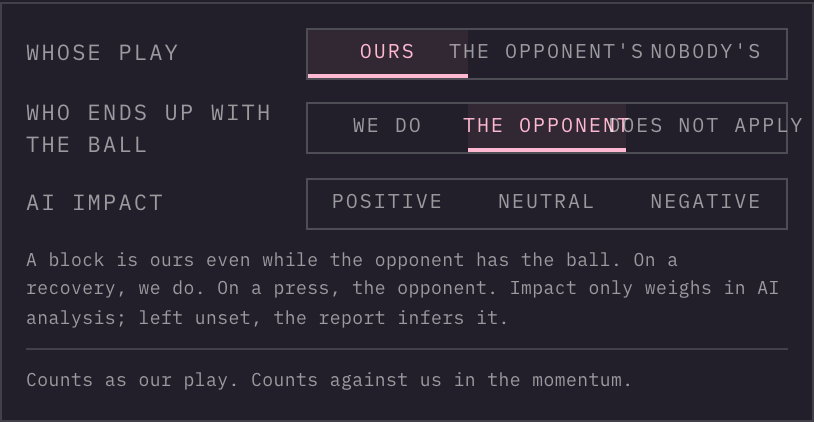 The two questions on the tag form, and the line that says what they do.
| Tag | Whose play | Who ends up with the ball |
|---|---|---|
| Outlet | Ours | We do |
| Block or Press | Ours | The opponent |
| Recovery | Ours | We do |
| Turnover | Ours | The opponent |
| Goal against | The opponent's | The opponent |
cliply does not guess either answer from the tag's name or from the row its button sits in. A tag with no answer still counts in the totals and in the per-tag counts, and is left out of the split and the momentum. The detail is in How each tag counts in the stats.
Look at how the starter decks are built
Before building yours from scratch, open the starter deck for your sport. It follows these rules: every action both teams perform comes as a pair (Penalty corner and Penalty corner against, Goal and Goal against), every tag already carries the two answers, and the recovery is its own button.
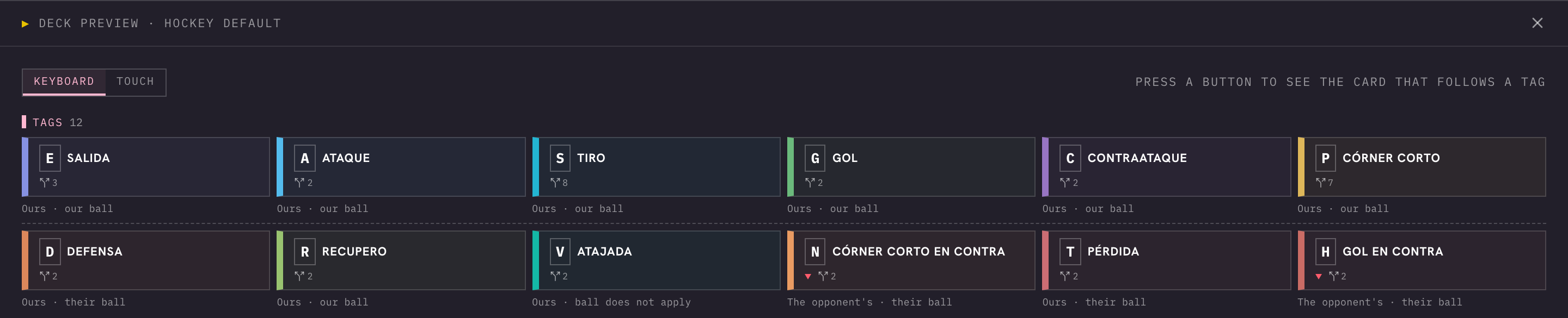 The hockey starter deck in the preview: under each button, whose play it is and whose ball.
In Decks, pick Deck from template to start from one and change what you need. The preview of any deck shows, under each button, whose play it is and whose ball, so you see how it is built before using it.
3. Give the outcome its own button
Tag the situation (press, outlet) and, separately, how it ended (recovery, turnover, goal). Then the stats can answer what happened after: how many presses were followed by a recovery within a few seconds. That is what Sequences does: it counts how often A is followed by B within N seconds, and also which A's were left without a B. See Video analytics.
The Successful and Unsuccessful qualifiers on a clip exist and show as a breakdown of the tag, but they are one more thing to remember live, and they do not move the split or the momentum.
4. Zones and periods from the first match, players when you can
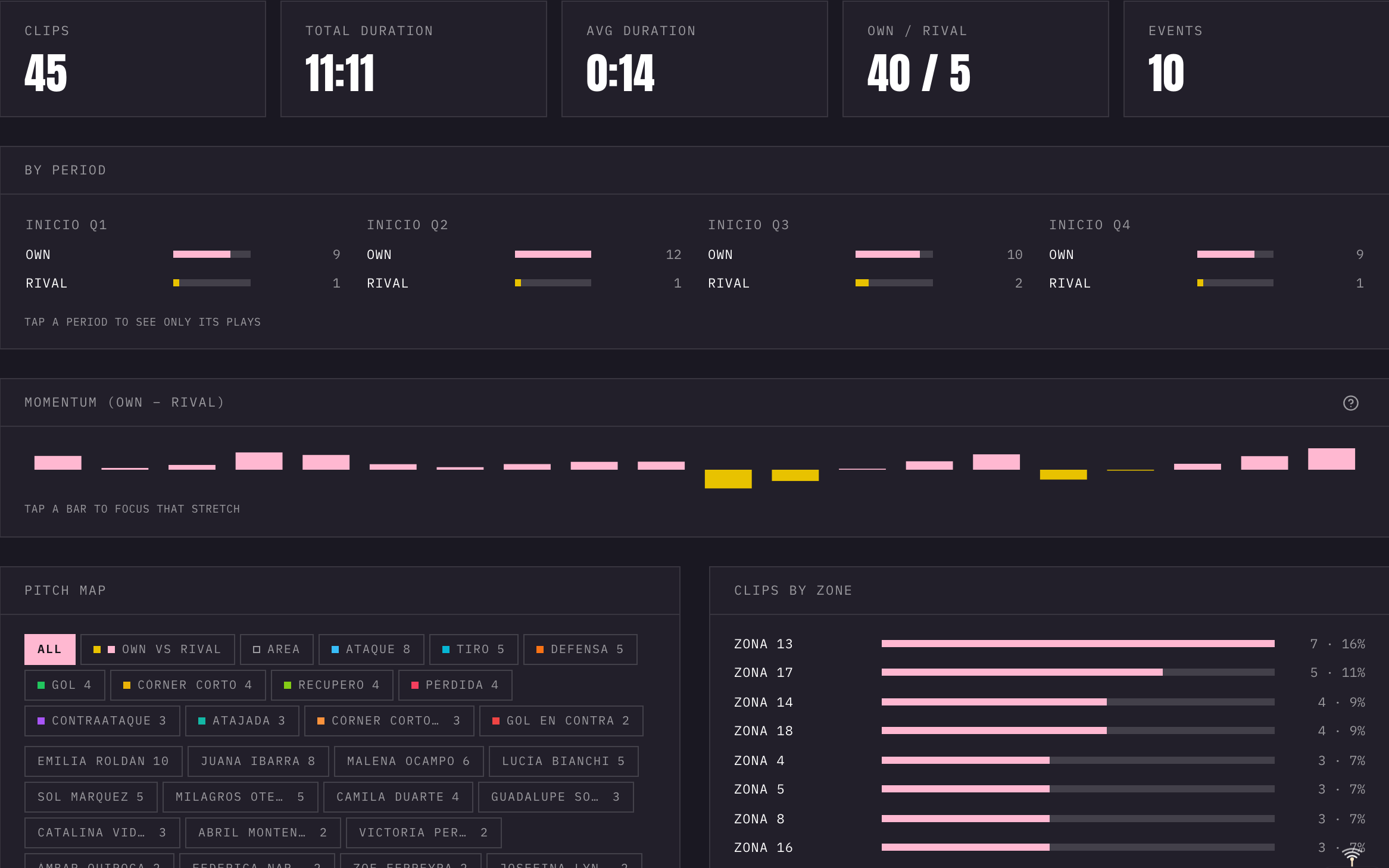
Without a zone there is no "from where" (see Zone maps). Without period marks, the split by quarter is an estimate. Without players there is no "who" (see Players and clubs).
Adding them in match one is cheap. Adding them later, clip by clip, to forty matches takes hours. On the stats screen, a block called Get more out of this match lists what the match lacks: no zone, no player or unmarked periods.
5. Keep the deck small
Count only what you will actually review with the squad. Every button is one more thing to press live and one more number to explain on Monday. If a tag changes no decision, it does not go in.
When you can skip all of this
If you only cut clips to show the squad and never look at the numbers, none of this is needed. Clips, totals and per-tag counts work with no classification at all.
When cliply isn't the right fit
- If you use one button for both teams, the team split cannot tell the clips apart: there is no per-clip team mark yet.
- If you want possession as spells, from one recovery to the next turnover, that does not exist yet: the momentum strip adds up seconds of clip per team and does not build those spells.
- If you want Successful and Unsuccessful to move the split or the momentum, they do not yet.
- If you need automatic positional data for the whole squad from the video (tracking), not yet. Drawing markers follow one player within a clip, but they do not produce that data.
Next steps
For the detail on each answer, read How each tag counts in the stats. To build the deck, see Decks and catalog. If you play field hockey, see Field hockey video analysis software. If you are still choosing a tool, read How to choose sports video analysis software. And to build a deck and try it out, /try lets you paste a YouTube match and tag it in the browser without signing up.
Try it on your own match
Paste a YouTube link to a match and tag it in your browser, no account needed.